Pixelmator Pro review
What Pixelmator Pro has become
Pixelmator Pro is now an Apple application for editing photographs, building layered designs, drawing vector artwork and painting on Mac and iPad. Apple acquired the Pixelmator team and brought the app into Apple Creator Studio in 2026. Mac users can still buy Pixelmator Pro separately as a one-time purchase, while a Creator Studio subscription provides the Mac and iPad versions alongside Final Cut Pro, Logic Pro and other creative applications.
Version 4.3, released on 30 June 2026, adds a Content Hub and generative image and shape tools. Those newer generative features require macOS or iPadOS 26 and Apple silicon. This distinction matters: the core editor supports older Macs running macOS 12 or later, but not every headline feature works on every supported computer.
A Mac-native editing workspace
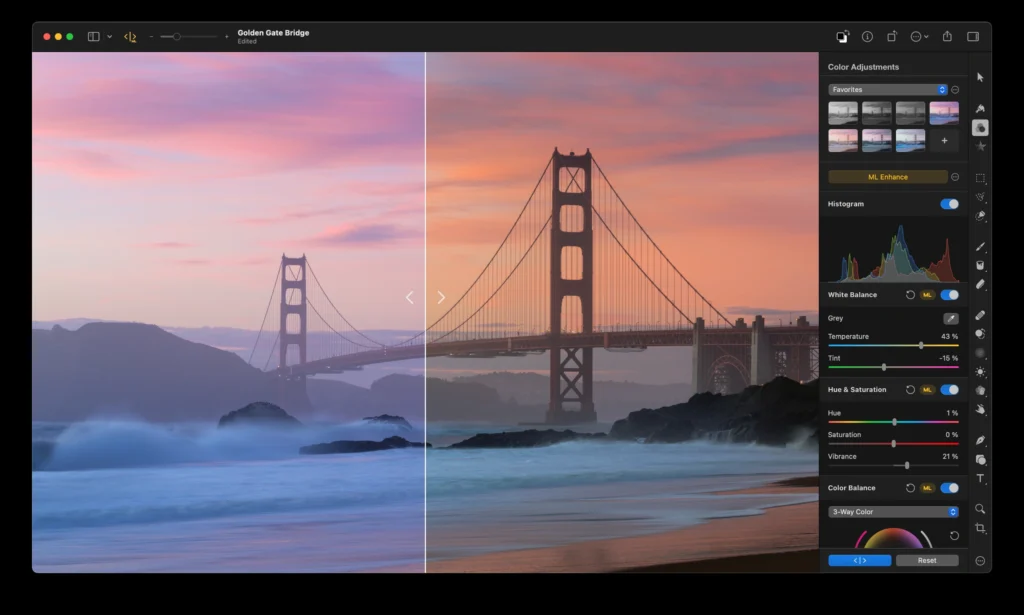
Pixelmator Pro’s appeal has always been its focused interface. The canvas occupies the centre, while tools, layers and adjustments remain close at hand without surrounding the image with many separate palettes. It feels designed around macOS rather than adapted from a cross-platform application.
The original article praised this organisation, but did not preserve enough test detail to support its broad speed claims. Pixelmator Pro uses Apple technologies such as Metal, Core Image and Core ML and is optimized for Apple silicon. Actual responsiveness still depends on image dimensions, layer count, effects, available memory and the Mac being used.
Photo editing and RAW support
The editor covers the main photographic workflow: exposure and colour adjustments, curves, selective colour, white balance, sharpening, noise reduction, cropping, masking and retouching. Adjustment layers allow changes to remain editable, while presets provide a quick starting point without forcing the image into a destructive workflow.
Apple lists support for RAW files from more than 750 camera models, alongside common formats including JPEG, TIFF, PNG, HEIF and WebP. Camera support is not universal, so photographers should confirm their specific model and compressed RAW format before making the application central to an archive.
Machine-learning tools include ML Enhance, Super Resolution, Denoise, Deband, automatic cropping and background removal. They can shorten repetitive work, but “AI” does not guarantee a better result. Hair, translucent objects, low-contrast edges and damaged image detail still deserve inspection at full size.
Layers, masks and retouching
Pixelmator Pro supports image, text, shape, video and adjustment layers. Bitmap and vector masks make it possible to isolate a subject or restrict an effect without permanently erasing the source. The Repair and Clone tools cover everyday cleanup, while Quick Selection and automatic subject and background tools speed up common masking jobs.
This is enough depth for product images, website graphics, social material and substantial photo composites. Complex prepress work remains a different discipline. Anyone exchanging documents with an Adobe-based workflow should test PSD import and export with representative layered files, because compatibility with a format does not mean every effect, smart object or typography feature transfers perfectly.
Design, vectors and typography
The application is broader than a photo editor. Shapes, vector paths, layer styles, templates, mock-ups and text tools make it suitable for posters, interface concepts and marketing graphics. Version 4.3’s Content Hub adds reusable photographs, graphics, shapes and illustrations, while newer releases include Warp tools and product mock-ups.
Pixelmator Pro can open and export SVG and PDF artwork and can work with Illustrator AI and EPS files. Designers should still evaluate colour management, print requirements and typography against their production workflow. The app is strongest when the final destination is a screen, an Apple document or a conventional image export.
Generative features and hardware limits
Apple’s current Creator Studio version can generate images from a text description, modify an image through instructions and create editable vector shapes. These features require macOS 26 or later and a Mac with Apple silicon. They are also tied to the Creator Studio offering rather than defining the complete one-time-purchase experience.
That makes the purchasing distinction more important than it first appears. The traditional editor remains valuable without generative tools, but buyers interested specifically in the newest intelligence features should check Apple’s subscription and hardware requirements before choosing a licence.
File formats and integration
Pixelmator Pro opens layered Photoshop documents and a wide range of image and video formats. Its own PXD format preserves the application’s layers, masks and effects. Integration with Photos, iCloud and Apple productivity apps suits people already working across Mac and iPad.
Pixelmator Pro and Photomator overlap but serve different priorities. Apple positions Pixelmator Pro for layered image creation and design, while Photomator concentrates on a photography workflow and batch editing. A photographer managing many shoots may therefore prefer Photomator as the first stop and Pixelmator Pro for detailed composites or graphic design.
Pricing and ownership
Pixelmator Pro is available as part of Apple Creator Studio, which Apple introduced at US $12.99 per month or $129 per year. Regional prices differ. Apple also continues to offer the Mac version as a separate one-time purchase, listed at US $49.99 at the time of this update.
The two options are not identical propositions. A separate Mac purchase suits someone who wants the established editor without a wider creative subscription. Creator Studio adds the iPad version, other Apple professional apps and subscription-linked content and intelligence features.
Pros and cons
| Pros | Cons |
|---|---|
| Clear Mac-native interface | Some new features require macOS 26 and Apple silicon |
| Strong combination of photo, vector and design tools | No Windows version |
| Layered, largely nondestructive workflow | PSD compatibility should be tested on complex production files |
| Choice of one-time Mac purchase or Creator Studio | Newest content and intelligence features favour the subscription |
Verdict
Pixelmator Pro is one of the most coherent creative applications available on the Mac. It offers substantially more than quick photo enhancement while remaining easier to approach than many traditional professional suites. Layers, masks, retouching, vectors and typography make it especially attractive to Mac users who move between photography and design.
The 2026 product is more complicated to describe than the old “Photoshop without a subscription” slogan suggests. A one-time Mac purchase still exists, but Apple Creator Studio now carries the Mac and iPad combination and some of the newest generative capabilities. Choose the standalone app for the established Mac editor; consider Creator Studio only if the wider collection and subscription features justify the continuing cost.
Pixelmator Pro 4.3 release notes · Apple Creator Studio announcement
0 Comments