Cisdem ContactsMate review
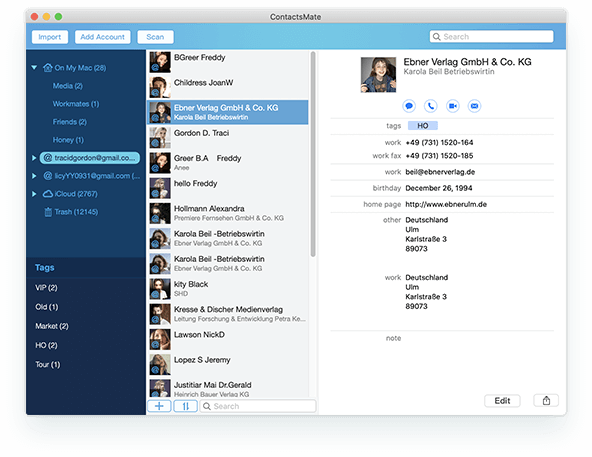
Cisdem ContactsMate is a dedicated contact manager for Mac that brings Apple Contacts, cloud accounts and imported address books together in one interface. Its strongest tools are duplicate detection, data-quality checks, flexible export and local backup. It is particularly useful for people whose address book has become too large or inconsistent for Apple’s standard Contacts app.
Cisdem ContactsMate review: the short verdict
ContactsMate is not a completely separate contacts platform. On the Mac it works as an extended management layer around the contacts and internet accounts already available through macOS, while also accepting CSV and vCard files. That approach makes it familiar and practical: changes can flow back to Apple Contacts and connected accounts, but you gain stronger tools for finding duplicates, repairing incomplete records and exporting selected fields.
The application is most valuable when you manage hundreds or thousands of contacts. For a small, clean personal address book, Apple Contacts remains adequate. For a business list assembled from several sources, ContactsMate saves considerable manual work.
Interface and daily use
The layout follows a conventional three-part contact manager. Accounts, groups and tags sit in the sidebar; the main list shows matching contacts; and an information panel exposes the selected record. Search can match names, phone numbers, email addresses and notes. Groups and tags make a large database easier to navigate, while batch selection is useful for moving, exporting or emailing several people at once.
The interface is functional rather than modern, but the important actions are easy to find. The menu-bar companion is a useful extra: it provides quick access to search, new contacts, messages, calls, FaceTime and email without keeping the full window open.
How ContactsMate works behind the scenes
After receiving permission to access contacts in macOS Privacy settings, ContactsMate reads the database exposed by Apple Contacts. Internet accounts such as iCloud, Google, Outlook, Exchange, Yahoo and AOL are handled through the account infrastructure available to macOS. ContactsMate displays those records together and writes approved edits back to the corresponding source. A saved edit can therefore also appear in Apple Contacts and, after that account synchronizes, on other devices.
This architecture is convenient, but it also means ContactsMate does not replace the sync engines of Apple, Google or Microsoft. Account authentication and the eventual propagation of changes still depend on macOS and the provider. Before a large merge or batch correction, creating a ContactsMate backup is sensible.
Import, export and account support
ContactsMate automatically loads the contacts available in Apple Contacts and can add supported internet accounts. Local lists can be imported from CSV, VCF or vCard files. CSV field mapping is important in practice because columns from another CRM or mail client rarely match perfectly; assigning fields during import reduces misplaced phone numbers, company names and notes.
Export is one of the app’s strongest areas. Selected records or complete groups can be written as CSV, Outlook CSV, vCard, TXT, DOCX, HTML, Excel, Numbers or Pages files. You can choose which fields to include, making the feature useful for migration, printed lists and controlled data hand-offs. Mail and Messages sharing is built in, and group email is available for straightforward communication tasks.
Duplicate detection and contact repair
The Scan function checks an account for exact and partial duplicates as well as common data problems. These include duplicate names, phone numbers, email addresses or postal addresses, blank or incomplete names, invalid characters, unusual prefixes and suffixes, missing company information and empty notes.
For each conflict, ContactsMate can edit, delete, merge or ignore the record. The merge preview is the crucial safeguard: it lets you inspect which values will be retained before committing the result. A Fix All option accelerates large clean-ups, but it should only be used after reviewing the conflict category and making a backup. Two people sharing a family phone number, for example, are not necessarily duplicates.
Backup, privacy and reliability
ContactsMate includes its own backup and restore workflow. It is designed as a safety net before editing or merging rather than a substitute for a full Mac backup. Contact information is sensitive, so the macOS permission prompt is meaningful: deny access and the app cannot manage the system contact store. Cloud-account data follows the security and synchronization model of the corresponding provider.
In normal use, searching and editing are responsive. Scanning a very large address book takes longer, but this is an occasional maintenance task. The application supports both Intel and Apple silicon Macs and, according to the current technical specifications, macOS 26 Tahoe as well as older systems back to OS X 10.11.
Advantages and drawbacks
What we like
- Strong duplicate and conflict scanning
- Works with Apple Contacts and common account providers
- Excellent range of export formats
- Groups, tags and batch operations
- Backup and restore before large changes
- Useful menu-bar access
What could be better
- Interface feels more functional than contemporary
- Bulk repairs still require careful review
- Cloud synchronization depends on macOS and providers
- Free trial restricts export and conflict repair
- Overkill for a small, tidy address book
Price and trial limitations
At the time of this review, Cisdem lists a one-year licence for one Mac at $29.99 and a one-time purchase at $49.99. Prices and promotions can change. The trial lets you create and edit contacts, manage groups and run scans, but restricts exporting, conflict repair and shortcut communication actions. Testing with a copy of your own contact data is the best way to decide whether the paid tools justify the cost.
Who should buy ContactsMate?
ContactsMate suits consultants, small businesses and long-time Mac users whose contact lists have accumulated duplicates and inconsistent fields across several accounts. It is also useful when you regularly exchange address data with Excel, Outlook or another system. People who only need basic editing and iCloud synchronization can remain with Apple Contacts.
Final verdict
Cisdem ContactsMate turns contact maintenance into a manageable workflow. Its combination of multi-source access, conflict detection, controlled merging, backup and broad export support goes well beyond Apple’s built-in app. The design could be fresher and automated repairs deserve caution, but the tool is effective where it matters.
MacAppCritic rating: 8.0/10. Recommended for Mac users with a large or untidy address book and for anyone who frequently imports or exports contact data.
0 Comments