Allavsoft for Mac review
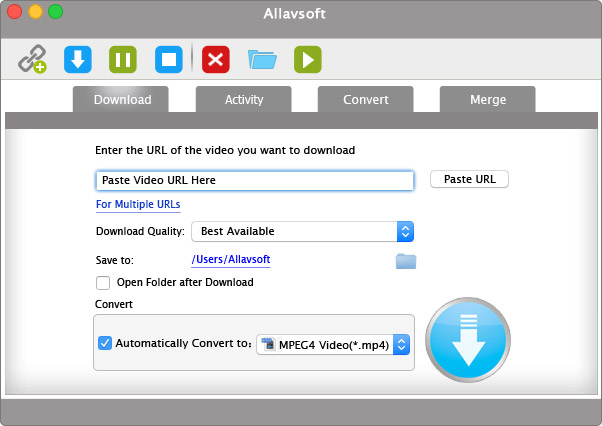
Allavsoft for Mac is a powerful video and audio downloader with broad format support, batch processing and integrated conversion. Unfortunately, its dated, blurry interface feels badly out of place on a modern Retina Mac.
There are Mac applications that make an excellent first impression and become disappointing once you start using them. Allavsoft is almost the reverse. Open it for the first time on a modern Mac and you may wonder whether you accidentally downloaded a version from ten or fifteen years ago. The interface is dated, the graphics look remarkably soft on a Retina display, buttons and icons lack the crispness we now take for granted, and very little about the application feels at home on a current version of macOS.
That is unfortunate, because underneath this frankly unattractive exterior is a surprisingly capable video and audio downloader.
Allavsoft is one of those applications where functionality and presentation seem to have developed along completely separate paths. The downloader has accumulated a substantial collection of features over the years, while its Mac interface appears to have been largely left behind. Whether that trade-off is acceptable depends on what matters more to you: a polished Mac experience or simply getting the media onto your drive.
Installation and first impressions
Allavsoft is available for both Windows and macOS. The developer advertises an unusually wide range of Mac compatibility, stretching back through many generations of macOS and even old Mac OS X releases. That is impressive from a compatibility standpoint, but it also gives a clue to the application’s biggest weakness.
Allavsoft does not look like a modern Mac application.
On a Retina or other high-resolution display, the problem becomes particularly obvious. Several graphical interface elements appear insufficiently sharp, with icons and artwork that look as though they were designed for much lower-resolution displays and subsequently enlarged. Text and native macOS elements can remain reasonably sharp, making the softer graphical elements surrounding them stand out even more.
This is not merely a question of fashionable design. macOS has used Retina displays for well over a decade, and modern Mac applications are expected to provide resolution-independent or suitably high-resolution interface assets. When an application does not, the result can look surprisingly crude.
The overall layout does not help. Allavsoft uses an old-fashioned combination of large graphical buttons, tabs, drop-down menus and controls that lack the spacing, typography and visual hierarchy of contemporary macOS software. It feels much more like a cross-platform utility that happens to have a Mac version than an application actually designed for the Mac.
For a utility that may cost around $60 for a lifetime licence, the presentation simply is not good enough.
Interface: 2/5
And that score is arguably generous.
Fortunately, using it is much easier than looking at it
The strange thing is that once you stop judging Allavsoft by its appearance and actually use it, the application starts redeeming itself.
Its basic workflow is extremely straightforward. Copy the URL of the media you want, paste it into Allavsoft and start the download. You can choose an output location and, when required, have Allavsoft convert the downloaded material into another format.
There is very little learning curve. Allavsoft is not trying to become a media-management application, browser or streaming service. Its principal job is to retrieve media and put a file on your Mac. In many circumstances it does that job very well.
Far more than a YouTube downloader
It would be easy to describe Allavsoft as another YouTube downloader, but that undersells it.
The developer promotes support for a very large number of video and audio websites and claims support for material ranging from standard-definition video through HD, 4K and even 8K. There is also support for downloading multiple URLs, playlists and batches rather than requiring every item to be handled individually.
The breadth of output formats is equally impressive. Video can be downloaded or converted into formats including MP4, MOV, AVI and MKV, while audio can be extracted or converted into formats such as MP3, M4A, FLAC, WAV, AAC and AIFF.
For someone building an offline media collection, that combination is considerably more useful than a simple browser extension that merely saves the original stream.
Allavsoft can also automatically convert a download, which means the entire process can effectively become one operation: paste a URL, select the desired format and let the application download and convert the media.
There is batch processing, download history, pause and resume functionality and even a built-in player for previewing downloaded material. It is quite a feature list for something that initially looks so primitive.
Features: 4.5/5
Downloading performance
Download performance depends heavily on the source website, connection speed and whatever technical changes the streaming provider has recently made. That last point is important with virtually every application in this category.
A video downloader is not interacting with a permanent standard. YouTube and other services regularly change the way content is delivered. A downloader that works perfectly today can suddenly fail tomorrow until its developer adapts it.
This is therefore one category of software where continuing development matters at least as much as the feature list.
Allavsoft has a reasonably encouraging history in this respect. User reports frequently praise the company’s support for responding when particular services stop working, although there are also users reporting exactly the opposite experience: sites that previously worked subsequently failing or requiring intervention from support.
That mixed experience is worth understanding before buying it. No application of this type can realistically guarantee that every advertised website will remain downloadable indefinitely.
When Allavsoft recognises the source correctly, however, the process is refreshingly uneventful. Paste, download and wait. That is precisely what a downloader should be.
Batch downloads are one of its best features
Downloading one clip is easy enough with countless utilities. Allavsoft becomes considerably more interesting when there are many files involved.
Multiple URLs can be queued and processed together, and playlist support can eliminate a considerable amount of repetitive work. This makes Allavsoft useful not merely for occasionally grabbing a clip, but for creating a local collection of material that you are entitled to download.
Downloads can also be converted automatically, which makes batch operation particularly useful. Instead of downloading ten files and subsequently feeding them through another conversion utility, Allavsoft can perform both jobs as part of the same workflow.
Conversion capabilities
Allavsoft is not merely downloading the file presented by the server. It also includes a fairly comprehensive media-conversion component.
This makes it possible, for example, to download video while ultimately saving only its audio, or to convert material into a format more appropriate for another device or application.
The interface for choosing formats is nowhere near as elegant as it could be, but the underlying functionality is extensive.
This also makes Allavsoft potentially useful alongside applications such as Final Cut Pro or other editors. Instead of discovering after a download that the resulting codec or container is not convenient for the intended workflow, the conversion can be incorporated into the original download operation.
The Retina problem really needs fixing
We have to return to the interface because on the Mac it is impossible to ignore.
Allavsoft is not merely aesthetically old-fashioned. Some interface graphics look genuinely poor on modern high-density displays. What might once have looked acceptable on an old non-Retina 1280 × 800 MacBook display becomes visibly soft when placed on today’s much denser screens.
This gives the application an unnecessarily cheap appearance.
Fixing this does not require reinventing what Allavsoft does. The developer does not need animations, translucent panels or elaborate visual effects. It needs clean scalable icons, Retina-quality assets, modern typography, sensible spacing and controls that resemble the operating system they are running on.
A restrained redesign using standard macOS interface conventions could transform the application without changing its underlying workflow at all. The present interface makes good software look considerably worse than it actually is.
A Mac application that needs to rediscover the Mac
Allavsoft’s public Mac information puts enormous emphasis on backwards compatibility. The company still advertises support for extremely old versions of Mac OS X, and its historical documentation discusses the transition to 64-bit Intel code.
What is much less obvious from the current product information is the status of a fully modern Apple-silicon implementation. That question has become much more important in 2026.
Apple has announced the end of general-purpose Rosetta support after macOS 27. Any Mac developer still depending on Intel-only code therefore has a rapidly approaching deadline.
We are not going to claim Allavsoft is Intel-only without inspecting the current application binary, but this is something Allavsoft should state clearly on its website. In 2026, “works on Mac” is not sufficient technical information. Mac owners should be told whether an application is Apple-silicon native, Universal or Intel.
Support may be Allavsoft’s hidden strength
Customer experiences with Allavsoft are interesting.
At the time of writing, Trustpilot shows an overall score around four stars from more than 300 reviews. A recurring theme among positive reviews is not merely that the program works, but that support responds when it does not.
That distinction is unusually important for download software. Websites change constantly, so occasional failures are inevitable. The question becomes how quickly the developer responds.
There are numerous reports from long-term users saying support provided fixes when a particular service stopped working. There are, however, negative reports as well, including users who say previously supported services ceased functioning reliably.
That is a more credible picture than pretending the application downloads everything, all the time. It does not. No serious review should promise that it will.
Support: 4/5
Value for money
Allavsoft currently offers monthly, annual and lifetime licensing, with the lifetime Mac licence advertised at around $60.
For an occasional YouTube download, that is difficult to justify. There are cheaper and even free alternatives.
For someone who regularly downloads video and audio from different sources, handles playlists, wants batch processing and regularly converts between media formats, the equation changes substantially. Allavsoft combines several utilities into one application.
The lifetime option is consequently the one that makes most sense to us, assuming the developer continues maintaining the product.
But paying around $60 also strengthens our criticism of the interface. This is not a $5 utility abandoned by a hobbyist. A commercial Mac application at this price deserves a professional Mac interface.
Value: 4/5
Privacy and account credentials
Some online services may require authentication before particular material can be accessed. Users should think carefully before entering valuable account credentials into any third-party downloading utility, not just Allavsoft.
If a download works without supplying account credentials, that is preferable. Downloading should of course be limited to material for which you have the appropriate right or permission. Purchasing software capable of downloading a stream does not automatically grant permission to copy everything that software can technically retrieve.
What we like — and what badly needs improvement
Allavsoft’s strengths are substantial: broad downloading support, batch processing, playlists, automatic conversion, audio extraction, many output formats, resumable downloads and a remarkably straightforward copy-and-paste workflow.
Its weakness is equally obvious. The Mac interface is badly overdue for redevelopment.
The low-resolution-looking graphics are particularly difficult to excuse on Retina Macs. The window design feels old, the controls have little relationship with current macOS design and the application gives almost no visual indication that there is a fairly powerful downloader underneath.
There is an irony here. Many developers produce beautiful applications containing very little functionality. Allavsoft has almost the opposite problem.
- Broad source support: Downloads video and audio from a wide range of websites.
- Batch and playlist processing: Multiple URLs and complete playlists can be queued together.
- Integrated conversion: Converts downloads to popular video and audio formats, including MP4, MOV, MP3, FLAC and WAV.
- Simple workflow: Copy a URL, paste it into Allavsoft and choose the required output.
- Useful download controls: Pause, resume, history and a built-in player make larger jobs easier to manage.
- Responsive support: The developer has a generally positive reputation for addressing broken website compatibility.
- Severely dated interface: The application looks and feels far behind current macOS software.
- Poor Retina presentation: Several icons and graphics appear soft or low-resolution on modern displays.
- Apple-silicon support is unclear: The developer should state clearly whether the current Mac build is native, Universal or Intel-only.
- Website compatibility can change: Downloads may stop working when streaming services alter their systems.
- Expensive for occasional use: The price is difficult to justify if you only download media infrequently.
Verdict
Allavsoft for Mac is difficult to score because there are effectively two products here. There is the downloader, which is flexible, powerful and frequently extremely useful. And there is the Mac application surrounding it, which looks embarrassingly dated.
If you care primarily about functionality, Allavsoft deserves serious consideration. Paste a URL, choose what you want and it generally stays out of the way while doing the work. Batch downloads and integrated conversion make it significantly more capable than the countless simplistic online downloaders scattered around the web.
If you expect a polished modern Mac application, prepare for disappointment.
The interface would have looked ordinary many years ago. On a modern Retina display it looks distinctly poor, with soft graphical elements and an overall design that belongs to an earlier generation of desktop software. For a commercial application still actively sold in 2026, that needs attention.
And that is what makes Allavsoft so frustrating. The developer does not need to reinvent the product. The difficult part already exists. Allavsoft has the downloading and conversion engine, the broad format support, batch processing and years of development behind it.
It simply needs a Mac interface worthy of the software underneath.
MacAppCritic rating: 3.5 / 5
- Functionality: ★★★★½
- Ease of use: ★★★★
- Interface design: ★★
- Retina/visual quality: ★½
- Features: ★★★★½
- Value: ★★★★
- Support: ★★★★
Bottom line
Powerful underneath, painfully dated on the surface. Allavsoft remains a surprisingly capable downloader, but in 2026 its blurry, old-fashioned Mac interface is becoming increasingly difficult to forgive.