Dashlane review
Dashlane in 2026
Dashlane is now primarily a browser-based password manager. On a computer, users sign in through the Dashlane extension and can open the wider web app from there. Direct login at the old app and console web addresses was discontinued on 1 October 2025. Safari users can still install a native macOS app together with the Safari extension from the Mac App Store, but the current experience differs substantially from the desktop application shown in this review’s older screenshots.
The plan structure has also changed. Dashlane no longer sells its Free, Essentials, Advanced or Premium Plus plans. New personal customers choose between Premium and Friends & Family, preceded by a 14-day trial. Both current plans provide unlimited password storage and use across unlimited devices; Friends & Family covers up to ten members.
Original interface impressions
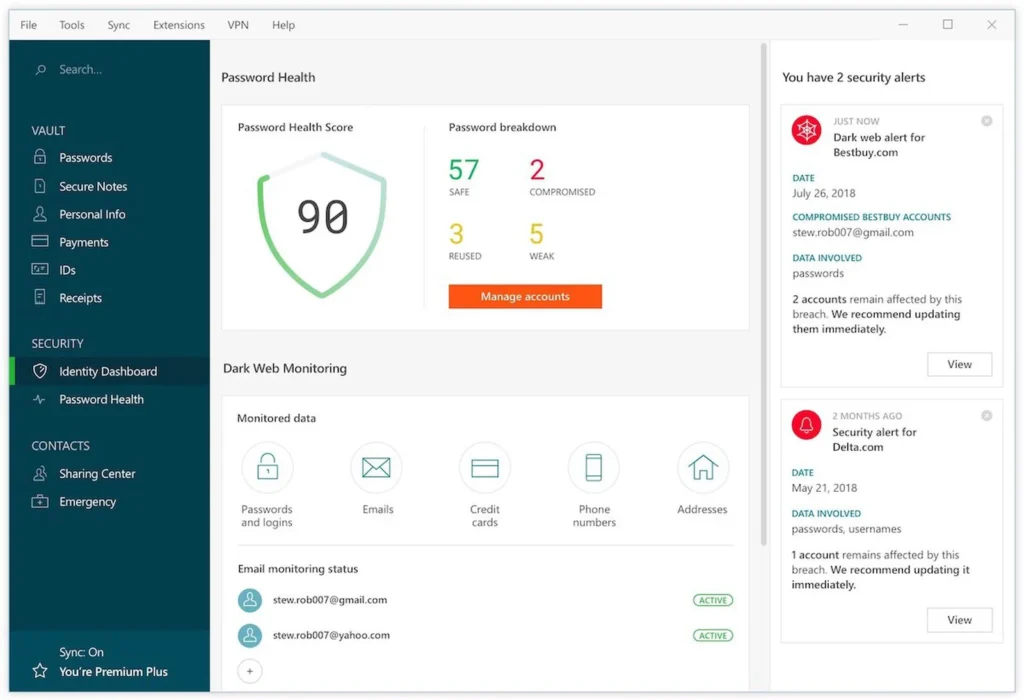
The interface was one of the strongest parts of my original test. It was clean, logically arranged and gave a useful overview of stored logins, personal information and security warnings. Those observations explain why I liked using Dashlane, although the current extension and web app should not be expected to look exactly like this dashboard.
Setup and account protection
Setup was clearly guided in my test. Existing credentials could be imported from a browser or another password manager, after which Dashlane stored them in an encrypted vault. The central security lesson remains the same: use a unique account credential, configure the available recovery options and protect the account with a second factor.
The older article stated that only the user could ever know the master password. That describes a traditional zero-knowledge master-password account, but Dashlane now also offers passwordless accounts to eligible new personal users and supports security-key login. Account and recovery behaviour therefore depends on how the current account was created.
Saving, generating and filling passwords
During the original test, Dashlane recognised login forms, suggested stored credentials and could save a newly created login. Its password generator made it easy to create a different, strong password for each service. This remains the heart of the product: reducing password reuse while removing the need to remember every credential.
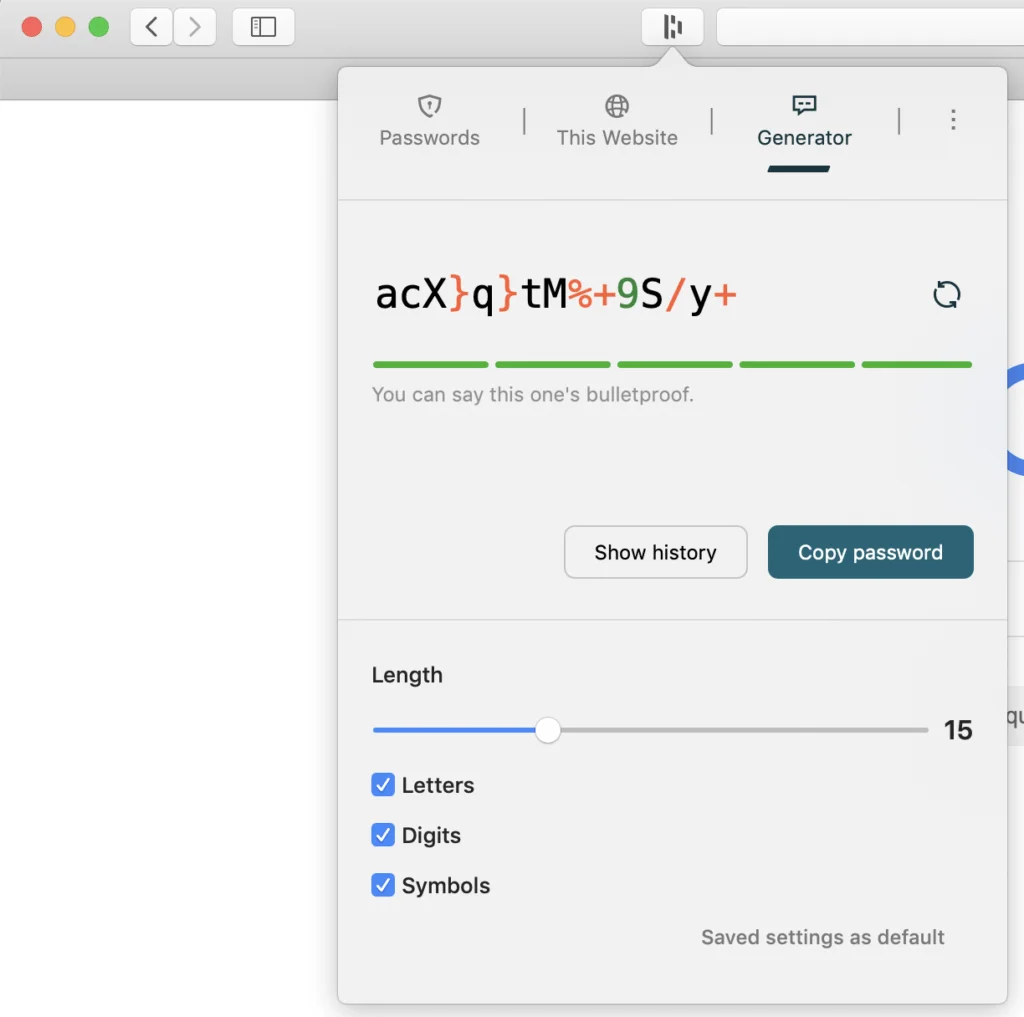
Current browser extensions are available for Safari, Chrome, Firefox and Edge. Dashlane says the Safari extension requires macOS 15 Sequoia or later. Safari also has some platform-specific limitations: Touch ID cannot currently unlock the extension, exporting a DASH file requires the web app in another supported browser, and some newer scam-protection features are unavailable in Safari.
Vault, sharing and security monitoring
Dashlane can store logins, secure notes, payment details, personal information and identity data. Sharing lets another Dashlane user receive access without sending the secret in an ordinary message. Password Health highlights weak, reused and compromised credentials, while Dark Web Monitoring watches configured email addresses for known exposure.
These features are helpful prompts rather than proof that an account is safe. A warning still requires the user to visit the affected service, change the credential and review recovery details and active sessions. Likewise, a high health score cannot protect an account from every phishing attack or compromised device.
VPN and current plan differences
The earlier article treated the VPN as a general feature of several paid tiers. Dashlane’s current personal-plan comparison lists Hotspot Shield VPN with Premium and for the manager of a Friends & Family plan. Invited family members do not receive VPN access through that family subscription. The VPN is a bundled third-party service, separate from the password vault, and should be judged on its own privacy terms and network performance.
Fixed prices from the old review have been removed because Dashlane changed personal pricing in February 2026 and the displayed amount varies by store, location and renewal history. Dashlane no longer offers monthly billing for new personal plans.
Everyday performance
In my original use, password capture, generation and autofill worked smoothly across the supported sites I visited. Synchronisation made changes available on my other devices without turning the vault into a complicated file-management exercise. Those are historical hands-on observations, not a fresh reliability test of the current extension.
The browser-first approach has a practical trade-off. It keeps password filling close to the websites where it is needed, but users who prefer a completely independent desktop application may find the extension-centred workflow less attractive. Safari users should pay particular attention to the current limitations listed above.
Pros and cons
| Pros | Cons |
|---|---|
| Clear interface and good original autofill experience | No free personal plan for new customers |
| Unlimited passwords and devices on current personal plans | Computer login requires the browser extension |
| Password Health, monitoring and secure sharing | Safari has several feature and export limitations |
| Passwordless and security-key options for eligible accounts | VPN access differs within the family plan |
Verdict
Dashlane remains a polished password manager for people who want strong autofill, cross-device access and proactive security warnings in one service. My original praise for its clarity and password generator still explains the appeal, but the old discussion of a 50-password Free plan and its fixed prices is no longer valid.
Today’s decision rests on the browser-first workflow and annual subscription. Premium suits one person who wants the complete feature set; Friends & Family extends vault access to a larger group, with a notable VPN limitation for invited members. Anyone relying on Safari should check the current macOS requirement and extension limitations before subscribing.
Compare Dashlane personal plans · Dashlane for Safari and macOS
0 Comments