Cisdem Data Recovery review
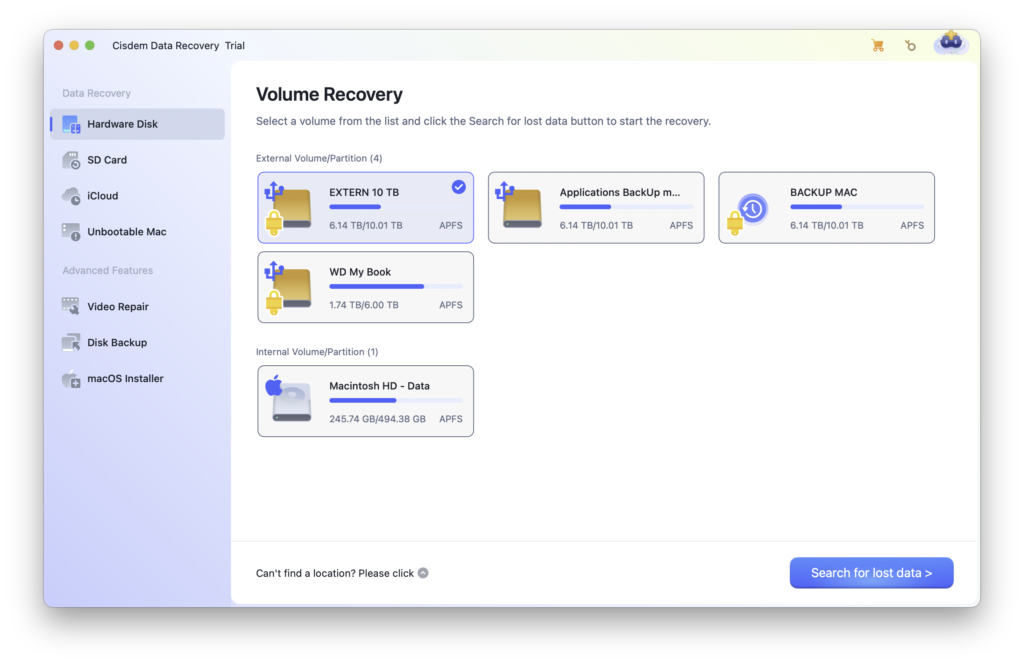
Cisdem Data Recovery today
Cisdem Data Recovery is a recovery utility for deleted files, formatted media, lost partitions and volumes that are damaged or no longer mount normally. Version 20.6.0, released in June 2026, focuses on faster recovery, improved accuracy and APFS support, better navigation and permission handling, and stability fixes.
The app runs on Intel and Apple-silicon Macs with macOS 10.15 Catalina through macOS 26 Tahoe. Cisdem lists a minimum of 1 GB RAM and 200 MB of installation space. Supported Mac file systems include APFS, HFS+, HFSX, FAT16, FAT32, exFAT and NTFS.
Cisdem’s current technical-specification page stops at macOS 26 Tahoe. Users of macOS 27 Golden Gate should verify the downloaded build on their Mac before purchasing.
What it can recover
Cisdem covers internal and external hard drives, SSDs, Fusion Drives, USB storage, SD and other memory cards, cameras and similar disk-based devices. Its format list includes common Office and iWork documents, photos and camera RAW files, video, audio, email, archives and Mac-specific files such as DMG packages.
Marketing pages alternate between “200+” formats and “more than 1,000 file types.” Those figures appear to count formats and individual signatures differently, so they should not be treated as a meaningful performance comparison. The practical question is whether the exact format and intact content you need appear in a trial scan.
Interface and recovery workflow
The workflow has three clear stages: select the affected location, search for lost data, then filter and preview the results before recovery. Cisdem can organise results by directory or file type and offers search and filters for filename, type, size and dates.
Quick scanning starts first and the application can continue into a deeper search. A file-system result may retain original names and folders, while signature-based recovery can find content without intact directory records. RAW results are harder to sort and may have generic filenames.
Scanning speed and realistic expectations
Cisdem says a healthy 1 TB drive may take roughly 10 to 12 hours to scan, depending on the drive and Mac. That is a more useful expectation than promises of instant recovery. Connection speed, media health, file-system damage and the number of signatures all affect the result.
The earlier article quoted precise recovery-rate percentages for Cisdem, Disk Drill, Stellar and EaseUS without a documented test protocol or reproducible dataset. Those numbers have been removed. Recovery success cannot be reduced to a universal percentage: it depends on what was overwritten, SSD TRIM, fragmentation, encryption and physical condition.
Preview, filtering and scan records
The free trial can scan a Mac-recognised device and preview recoverable files, but a licence is required for recovery. Previews are important: test several of the exact documents, photos and videos you need rather than assuming a filename means intact content.
A scan record can be saved and reloaded later, avoiding a repeat scan of a large healthy device. For an unstable disk, however, repeated reading may make matters worse. Create a sector-level image first if the hardware permits, or stop and use a professional recovery service when the drive disconnects, clicks or disappears from Disk Utility.
APFS, SSDs and TRIM
Version 20.6 specifically claims enhanced APFS support. Cisdem also supports common removable-drive formats and can scan NTFS storage from a Mac. Encrypted or security-chip-protected internal storage remains dependent on valid credentials and what macOS makes accessible.
Deleted files on an SSD can become unrecoverable quickly because TRIM lets the controller clear unused blocks. No consumer recovery app can reconstruct overwritten or erased content. Stop using the source immediately, install the utility elsewhere and save recovered files to a different disk.
Unbootable Macs and drive images
Cisdem documents a Recovery Mode route for a Mac that will not start normally, plus a bootable macOS installer creator. Preview support is more limited in Recovery Mode, so suspected files may need to be recovered before they can be inspected fully.
The app can also create a drive backup image and scan that image instead of continuing to work directly on the source. This is the safer approach when a readable disk shows logical errors. It is not a substitute for specialist imaging hardware when a device is physically failing.
File repair and cloud destinations
Current releases include repair tools for damaged photos, videos and documents. Repair can help when a recovered file exists but will not open, yet it cannot recreate data that is no longer present. Always preserve the untouched recovery and experiment on copies.
Recovered files can be saved locally or sent to supported cloud services including Dropbox, OneDrive, pCloud and Box. A separate local disk is usually the simplest recovery destination because it avoids network interruptions and prevents writing back to the source.
Pricing and licensing
Cisdem currently lists three one-Mac licences: $59.95 per month, $99.95 per year and $149.95 for a lifetime licence. The store advertises instant activation, support and a 30-day money-back guarantee. Taxes and temporary discounts can alter the checkout price.
The monthly price is high for a single recovery job, but paying only makes sense after the free scan has shown useful results. Read the refund conditions and confirm whether a subscription renews automatically before purchase.
Pros
- Current support for Intel, Apple silicon and macOS Tahoe.
- APFS plus broad removable-media and format support.
- Useful preview, filters and reusable scan records.
- Drive-image, Recovery Mode and file-repair tools.
Cons
- No published macOS 27 compatibility at the date checked.
- No recovery tool can overcome overwriting or SSD TRIM.
- Large scans can take many hours.
- Recovery requires a paid one-Mac licence.
- Marketing uses inconsistent file-type counts.
Verdict
Cisdem Data Recovery 20.6 is a well-equipped Mac recovery application with a clear workflow and useful tools for APFS, drive images and unbootable Macs. It deserves consideration when macOS still recognises the affected device and the loss is logical rather than physical.
It is not defensible to call any product the universal recovery winner without controlled, repeatable testing. Use Cisdem’s trial to scan and preview the exact files, recover to another disk and treat physical warning signs as a reason to stop. A verified preview is more valuable than any advertised recovery-rate percentage.
Cisdem Data Recovery for Mac · Technical specifications · Release notes · Current licences
0 Comments