Acronis True Image review
Acronis True Image
Acronis True Image combines local and cloud backup with malware protection. That makes it broader than utilities which only copy folders or create a local archive. A single application can protect an entire Mac, selected disks, files and folders, while higher subscription tiers add cloud storage and more extensive security features.
The combination is useful for households that want one dashboard, but it also makes the product more complex. The right question is not whether Acronis has the longest feature list. It is whether you need integrated backup, cloud recovery and security badly enough to accept an annual subscription and spend time configuring them properly.
Setup and interface
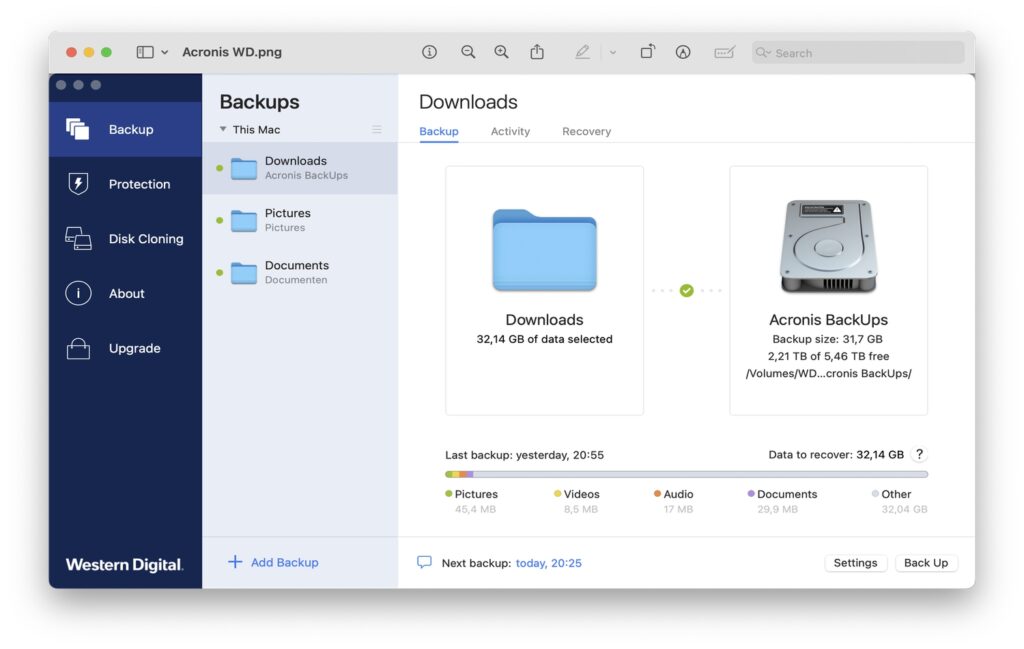
In our earlier test, the interface was one of Acronis’s strengths. Backup sources, destinations and protection status were presented clearly. Installation required administrator approval, Full Disk Access and a helper component so the application could read protected files and run scheduled work. The online dashboard handled devices, licences and cloud activity.
A first backup still follows a simple pattern: select the entire Mac or specific data, choose local, network or Acronis Cloud storage, configure encryption and scheduling, then start the job. Before relying on the result, open the recovery view and restore a small file to another folder. Recovery is the purpose of a backup, and a practical test catches mistakes that a completed-status icon cannot.
Local, NAS and cloud backup
Acronis can create disk-level backups as well as file-and-folder backups. Destinations include internal or external drives, supported network shares and NAS devices, and Acronis Cloud when included in the subscription. A useful strategy combines a fast local copy with an off-site copy so one hardware failure, theft or ransomware incident does not affect every version.
Incremental backups copy changes after the initial full backup, reducing time and storage use. Retention rules determine how many older versions remain. “Unlimited versions” should not be assumed: practical retention is constrained by the configured cleanup policy, available storage and the selected plan.
On the Mac, Acronis supports APFS, HFS+, FAT32 and reading backups from NTFS media. Its documentation warns that an NTFS disk cannot serve as a Mac backup destination. RAID and NAS support also have documented limits, so unusual storage setups should be checked before purchase.
Encryption and account dependence
Backups can be protected with a password chosen by the user. That is valuable for removable disks and cloud storage, but the password must be stored safely: encryption that prevents an attacker from reading the archive can also prevent the owner from recovering it. Product activation, protection updates and Acronis Cloud features require an internet connection.
Anti-ransomware and antivirus protection
Acronis’s differentiating feature is the integration of backup and malware defence. Active Protection monitors behaviour associated with ransomware and can try to stop a process that is rapidly changing files. The security component also offers antivirus scanning and, depending on the plan and platform, additional web and identity-related protection.
Behavioural detection matters because ransomware cannot be identified solely by a catalogue of known signatures. It does not make the product infallible, however. Security results from Windows tests should not be presented as proof of identical Mac performance. We found no basis for the earlier article’s assumption that a Windows certificate automatically established the same result on macOS.
Integrated security can reduce the number of separate applications, but avoid running multiple real-time antivirus engines simultaneously without checking compatibility. Keep macOS and Acronis updated, use multi-factor authentication for the account and retain at least one backup that is not continuously writable from the Mac.
Disk cloning and recovery on Apple silicon
The previous review made cloning sound like an immediate route to a bootable replacement Mac. Current Acronis documentation describes a more involved workflow on Apple silicon. Data is first cloned to an external disk. On the destination Mac, the internal disk is erased, macOS is reinstalled through Recovery and Migration Assistant transfers the data from the clone. That is useful migration and recovery, but it is not the instant external-startup experience familiar from older Intel Macs.
Intel Macs can still use a cloned external disk under supported conditions. Models with the T2 chip may require changes in Startup Security Utility. Those security settings should not be weakened as a routine step and forgotten; follow the current Acronis and Apple instructions for the exact Mac.
Acronis bootable media provides a recovery environment when macOS cannot start. The media and recovery version must match the supported Mac configuration, and a restore rehearsal remains advisable before an emergency.
Performance and practical use
Our earlier experience was positive: the application made the main backup choices understandable and subsequent incremental runs required less time than the initial copy. We did not repeat speed, malware or recovery benchmarks with the 2026 release. Cloud performance depends mainly on upload bandwidth, archive size and the number of small files. Full scans and large backups can temporarily increase processor, disk and network use, so scheduling them outside busy periods is sensible.
The dashboard is convenient when several devices share a plan. Users seeking only a local copy to one external disk may find the account, security and cloud options excessive. A dedicated backup utility or Time Machine can be simpler, although it will not reproduce the same integrated security and remote-management package.
Plans and pricing
Acronis True Image is subscription-based. The Essentials, Advanced and Premium tiers cover up to five computers depending on the chosen device count, plus mobile devices. Essentials concentrates on local backup and basic anti-ransomware protection and includes no cloud storage. Advanced adds cloud backup and broader anti-malware features, while Premium starts with more cloud capacity and priority support. Acronis listed starting annual prices of $49.99, $72.99 and $124.99 respectively during this editorial check, but regional prices, tax, promotions, storage and device count can change the actual amount.
Pros
- Combines full-Mac, disk, file, local, NAS and cloud backup.
- Clear interface and central dashboard.
- Incremental backups and configurable retention.
- Integrated ransomware monitoring and antivirus protection.
- Current support for Intel and Apple-silicon Macs through macOS Tahoe.
- Bootable recovery media and documented migration tools.
Cons
- Annual subscription, with useful cloud capacity reserved for higher tiers.
- More complicated than a straightforward local backup utility.
- Apple-silicon cloning requires reinstall-and-migrate steps rather than instant booting from the clone.
- Cloud backup can take a long time on limited upload connections.
- Security marketing and Windows test results should not be treated as Mac-specific proof.
- Some storage formats and RAID configurations are unsupported or limited.
Verdict
Acronis True Image is most convincing for users who want local and off-site backup plus security in one managed product. Its interface lowers the barrier to creating a complete backup, and the combination of versioned recovery with ransomware monitoring has practical value.
For a single Mac with one external disk, the subscription and feature set may be more than necessary. For several devices, cloud recovery or a household that wants one protection dashboard, the broader package can justify the cost. Whichever plan is chosen, encrypt carefully, keep an offline copy and test recovery before the backup is needed.
0 Comments