iBoysoft Data Recovery review
iBoysoft Data Recovery for Mac today
iBoysoft Data Recovery is designed to retrieve deleted or inaccessible files from storage that macOS can still detect. The current documentation lists support from Mac OS X 10.11 El Capitan through macOS 27 Golden Gate. It runs on Intel and Apple-silicon Macs, including current M-series models.
The app handles APFS, encrypted APFS, HFS, HFS+, HFSX, exFAT and FAT32. Supported devices include internal drives, external hard drives, USB storage and memory cards. RAID reconstruction is not supported, while Fusion Drive recovery is still described as under development. NTFS recovery belongs to the separate Windows edition; the old article’s suggestion that the Mac app itself covers NTFS has therefore been removed.
Installation requires more trust than an ordinary app
Installation was straightforward in the original test, but iBoysoft needed additional approval in System Settings. That remains an important consideration. The current help documentation says the app requires Full Disk Access and a system extension. On Apple-silicon Macs, enabling that extension can require booting into macOS Recovery, reducing the startup-security setting and restarting.
This is more intrusive than installing a normal utility. It does not automatically make the software unsafe, but users should understand the trade-off before changing security settings. Download only from iBoysoft or the Mac App Store, restore the normal security configuration when appropriate and remove the extension if the software is no longer needed.
Interface and recovery workflow
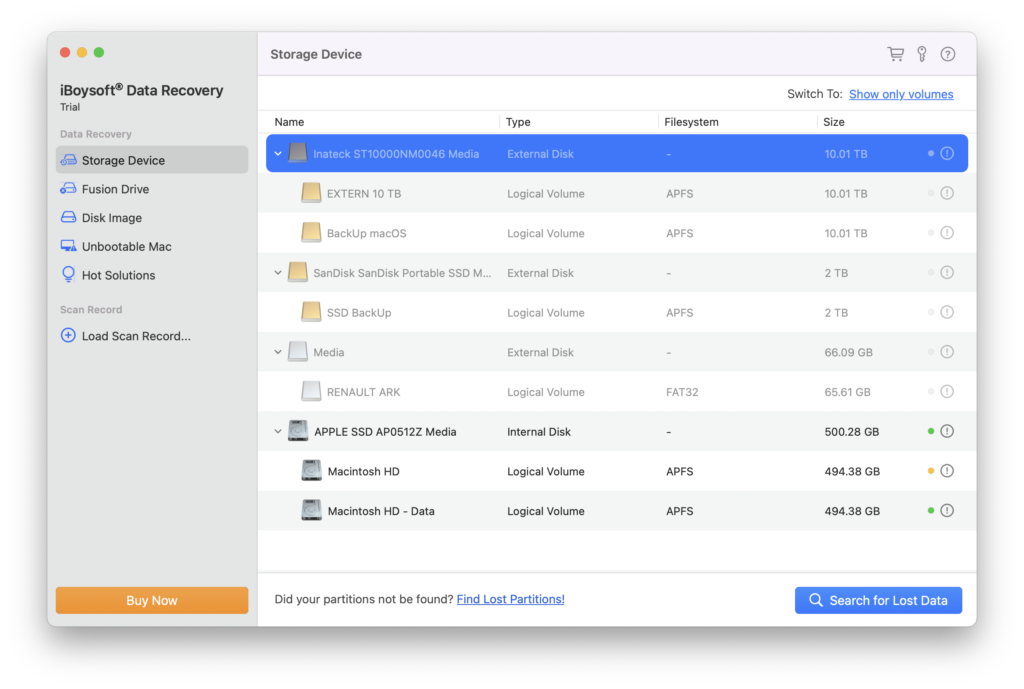
The tested version presented a clean, uncomplicated starting screen. Select a device, search for lost data, inspect the results and recover selected files to another drive. The current app follows the same basic sequence and can organise results by path, file type and recovery method.
Previewing is valuable because a scan can return thousands of fragments or generically named files. iBoysoft relies on macOS and installed applications such as Preview, QuickTime or Microsoft Office to show supported files. A successful preview is encouraging, although it does not guarantee that every byte of a large recovered file is intact.
What we tested
For the original review we created a test set containing BMP, JPEG, Word, Excel, PDF, PNG and DMG files, then performed recovery attempts after different erase procedures. That work showed that iBoysoft could retrieve useful material, but its scan was noticeably slower than Disk Drill in our comparison. FLAC files were not recognised in that test.
Those observations apply to the version and hardware tested at the time; they are not a benchmark of the current release. The present product page lists audio recovery in general, but does not publish a complete, version-specific signature list. Anyone buying the application for an unusual format should scan and preview representative files with the trial before paying.
Quick scan, deep scan and RAW recovery
A quick scan uses available file-system information to locate recently deleted data and can often retain original names and folder structure. A deeper signature-based search reads more of the device and can find data when the directory is damaged or missing. That search takes longer and reconstructed files may receive generic names because their original metadata is gone.
No recovery application can reverse overwriting. Deleted data is recoverable only while the relevant storage blocks still contain usable information. SSDs add another complication: TRIM and controller behaviour may make deleted data disappear quickly. Stop using the affected disk immediately, do not install the recovery app on it and never save recovered files back to the source.
Formatted, encrypted and inaccessible disks
iBoysoft can scan APFS and HFS-family volumes as well as exFAT and FAT32 media when the device remains visible to macOS. The company also documents encrypted APFS recovery when the correct password is available. Logical recovery cannot repair physical damage, and a drive that repeatedly disconnects, clicks or never appears in Disk Utility is a case for a professional recovery laboratory rather than repeated home scans.
The app uses read-only access while scanning the source. This is the correct design, but it does not remove the need for caution. Avoid First Aid, formatting and repair tools until important data has been copied elsewhere, because each write can reduce recovery prospects.
Recovering from an unbootable Mac
One of iBoysoft’s stronger features is Recovery Mode operation. On a Mac that will not boot normally but can still enter macOS Recovery, the software can be launched through Terminal and results saved to a connected external disk. iBoysoft documents support for both Intel and Apple-silicon Macs.
This route requires a network connection for the normal Recovery Mode launcher, although the company also documents an offline USB preparation method. A Professional licence is tied to one Mac, including an unbootable Mac, so a separate licence may be needed if another machine has already consumed the activation.
Performance and expectations
The original scan worked but felt slow, and its interface was less refined than Disk Drill’s. Deep scans of large drives can take hours; speed depends on capacity, connection, file-system damage and the number of signatures being searched. A long scan is not proof that more intact files will be recovered.
The trial is therefore essential. It allows scanning and previewing but not recovery. Check whether the exact files you need appear, preview several of them and only then consider a licence. Keep in mind that some partially damaged documents or videos may preview but still fail during normal use.
Pricing and licensing
Current Professional pricing is $89.95 excluding VAT for one month, $99.95 excluding VAT for one year with automatic renewal, or $169.95 excluding VAT for a lifetime licence. Each Professional licence covers one Mac. The company advertises a 14-day money-back policy, but buyers should read its refund conditions rather than treating it as an unconditional trial.
These prices replace the lower and differently structured amounts in the old article. A Technician edition is available for service providers and can be deactivated across five Macs. Ordinary users should not buy until the free scan has demonstrated that their target files are plausibly recoverable.
Pros
- Supports APFS, encrypted APFS, HFS-family, exFAT and FAT32 volumes.
- Can scan an unbootable Mac from Recovery Mode.
- Clear selection, preview and recovery workflow.
- Uses read-only access while scanning the source.
Cons
- Apple-silicon setup may require reduced startup security and a system extension.
- The trial scans and previews files but does not recover them.
- One-Mac licensing is restrictive and current pricing is high.
- The original test was slower than Disk Drill and did not recognise our FLAC files.
Verdict
iBoysoft Data Recovery for Mac remains a capable option when a disk is readable by macOS but files have been deleted, a volume was formatted or the file system has become inaccessible. APFS support, previews and Recovery Mode operation give it genuine practical value.
It is not a magic repair tool. Recovery depends on the condition of the source, how much data has been overwritten and whether the drive is physically healthy. The security changes required on some Macs and the single-machine licence deserve careful consideration. Use the trial to verify the actual files, recover to a different disk and involve a specialist if the hardware shows signs of failure.
iBoysoft Data Recovery for Mac · Official online help · Current licence options
0 Comments