Bitdefender Antivirus review
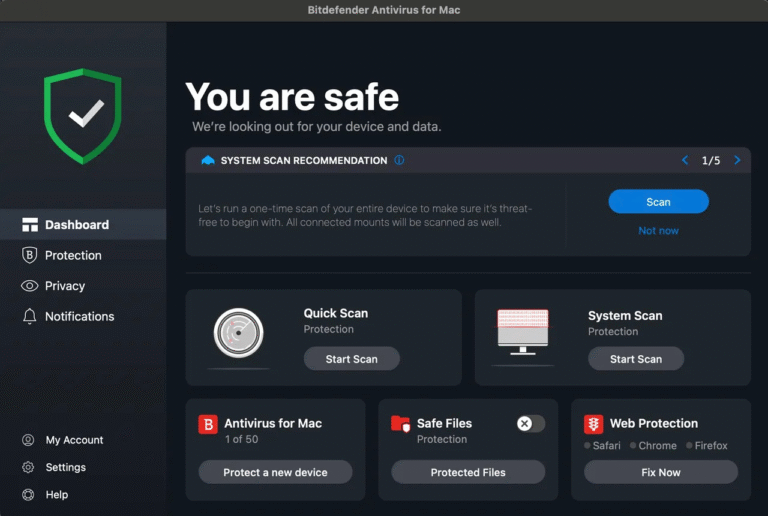
Bitdefender Antivirus for Mac focuses on the essentials: real-time malware protection, ransomware safeguards, web protection and removal of unwanted adware. It is a narrower product than a large cross-platform security suite. That simplicity is useful if you already have a password manager and backup system, but the included VPN is too restricted to replace a normal VPN subscription.
The current Mac version has strong independent test results and runs natively on Apple silicon. The original hands-on test also found its interface clear and its everyday impact modest. Buyers should nevertheless distinguish the standalone Mac product from broader Bitdefender plans, because feature lists on comparison pages can cover several different subscriptions and operating systems.
Installation and permissions
Installation starts from Bitdefender Central, where the Mac is linked to the subscription. On current versions of macOS, protection software needs approval for its security extension and related modules. macOS may open System Settings so that these permissions can be granted. Bitdefender cannot provide complete real-time protection until the requested components are allowed.
After installation, check that the dashboard reports the Mac as safe and that automatic protection is active. Avoid running two antivirus products with real-time scanning at the same time. Competing security extensions can inspect the same file, slow the Mac and produce confusing warnings.
Interface and scans
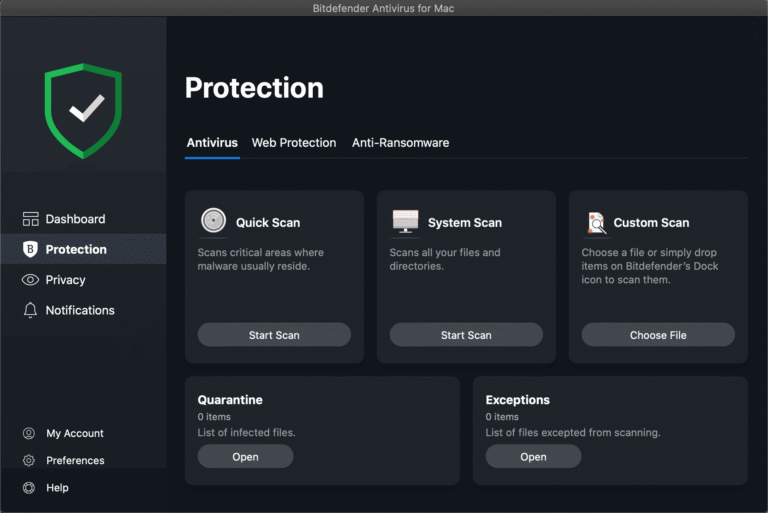
The original test found the dashboard easy to understand. Its status display made it obvious whether protection was working, while the main scan choices stayed within reach. A System Scan examines the Mac broadly; a Custom Scan is more suitable when only a download, external disk or particular folder needs checking.
Bitdefender also added a Finder service in the tested version. Right-clicking a file or folder and choosing “Scan with Bitdefender” was faster than opening the full application. The exact menu wording can change with releases, but targeted scanning remains useful for an unfamiliar installer or archive.
Real-time malware protection
Bitdefender monitors files as they are opened or created and can quarantine malicious content before it runs. Its scope includes Mac malware as well as unwanted adware. Detection also matters when a Mac stores a Windows threat: that file may not infect macOS, but stopping it prevents the Mac from passing it to another computer.
Security software is only one layer. Keep macOS and browsers updated, obtain applications from known publishers and treat unexpected login prompts as suspicious. An antivirus application can inspect downloads and behaviour, but it cannot make every decision for the user.
Independent Mac test
AV-TEST evaluated Bitdefender Antivirus for Mac 10.3 on macOS Tahoe in June 2026. It received 6 out of 6 for protection, 6 out of 6 for performance and 6 out of 6 for usability: a total of 18 out of 18. This is persuasive current evidence for the tested release and sample set.
Laboratory results do not measure every part of the product. They do not prove the privacy quality of the VPN, assess customer support or guarantee identical results against a future threat. They do provide a much firmer basis than invented speed figures or a small collection of hand-picked malware samples.
Web protection
Bitdefender’s web protection is designed to warn about malicious and fraudulent pages before they can steal credentials or deliver malware. The company lists support for Safari, Firefox and Chrome. Browser protection is especially valuable against phishing, where a convincing page may be more dangerous than a traditional infected application.
A warning should be treated as a reason to stop and verify the address independently. No filter catches every new phishing site, and a padlock only means that a connection is encrypted. It does not prove that the organisation behind a website is legitimate.
Ransomware and Time Machine protection
Bitdefender includes protection intended to prevent unauthorised changes to important files and Time Machine backups. Protecting the backup destination matters because ransomware is most damaging when it reaches both the original data and the available recovery copy.
This feature is not a substitute for backup. Continue using Time Machine or another versioned backup tool, and keep an additional copy that is not permanently exposed to the Mac. Test an occasional restore. A backup is only trustworthy when files can actually be recovered.
Included VPN
Antivirus for Mac includes Bitdefender VPN, but the standard allowance is limited to 200 MB of traffic per device per day. That is enough for brief protection on public Wi-Fi, not for routine browsing, streaming, large downloads or continuous use. Unlimited traffic requires a separate Premium VPN plan or an eligible broader Bitdefender subscription.
A VPN encrypts traffic between the Mac and the VPN server. It does not provide complete anonymity, erase tracking within signed-in accounts or turn a fraudulent website into a safe one. Judge the antivirus product on its security value without treating the limited VPN as an unlimited bonus.
What is not included
The standalone Mac product does not try to be a complete identity and privacy suite. It should not be assumed to include an unlimited VPN, a password manager or every feature advertised for Bitdefender’s multi-device plans. It also does not replace Time Machine with a cloud-backup service.
This smaller scope can be an advantage. Users who already rely on Apple Passwords, a dedicated password manager or another VPN avoid paying for overlapping tools. Anyone wanting protection for several platforms and a larger set of account services should compare Bitdefender’s current multi-device subscriptions before choosing.
Compatibility and current version
Bitdefender Antivirus for Mac supports macOS 10.10 Yosemite and later, requires at least 1 GB of free disk space and supports Safari, Firefox and Chrome for web protection. The VPN requires macOS 10.12 Sierra or later. Bitdefender supports final public macOS releases rather than beta versions.
The company lists compatibility through macOS 27 Golden Gate as well as macOS 26 Tahoe, Sequoia, Sonoma, Ventura, Monterey and Big Sur. Apple-silicon Macs are supported natively without Rosetta 2. The latest version listed at the time of this update is 10.3.4.12, released on 17 August 2026.
Performance
In the original hands-on use, Bitdefender stayed unobtrusive during normal work. A full scan naturally caused more disk and processor activity than passive protection, but the interface remained responsive. Those are historical observations rather than measurements of the current release.
The June 2026 AV-TEST performance score of 6 out of 6 is the stronger current reference. Actual impact still depends on storage speed, the number of files and other background software. On an older Mac, let the first full scan finish when demanding work is not in progress.
Subscription and value
Security subscriptions are often sold with a first-year discount followed by a higher renewal charge. Compare the renewal price, number of protected Macs, cancellation terms and the cost of any separate unlimited VPN. A low introductory figure alone does not show the long-term value.
Bitdefender Antivirus for Mac makes most sense for someone who wants focused malware and web protection rather than a large bundle. Its strong current laboratory result supports that core proposition. The limited VPN adds little value for a person who needs one every day.
Pros
- Excellent 18/18 AV-TEST result for version 10.3 in June 2026.
- Clear, focused interface in the original Mac test.
- Real-time malware, adware, web and ransomware protection.
- Time Machine protection adds another safeguard around backups.
- Native support for Intel and Apple-silicon Macs.
- Targeted scans are accessible without navigating a complex suite.
Cons
- The included VPN is limited to 200 MB per device each day.
- No password manager or cloud backup in the standalone Mac product.
- Current macOS permissions add several installation steps.
- Introductory pricing can obscure the later renewal cost.
- The latest version was not independently retested for this update.
Verdict
Bitdefender Antivirus for Mac is a strong choice for focused Mac protection. Its current 18/18 independent result, native Apple-silicon support and straightforward controls are more important than a long list of loosely related extras. The original hands-on experience also supports its reputation for staying quiet during ordinary use.
The main qualification is the product’s narrow scope. The daily VPN allowance is only suitable for brief use, and an unlimited VPN, password manager and backup strategy remain separate decisions. If that is understood, Bitdefender offers a convincing antivirus core without forcing the Mac into an oversized security dashboard.
0 Comments